- Important Information relating to Web Development
- Data types in Javascript
- Statements in Javascript
- Web APIs in Javascript
- Interfaces (Not available in JavaScript)
- Prototypes
- Variable and Constant values
- Values vs. References in Javascript
- Functions in Javascript
- General information about Javascript
- Asynchronous Programming in Javasript
Dateobjects in Javascript- DOM (Document Object Model)
window.document- What is an HTMLCollection?
- Nodes in DOM
- Removing & Replacing Nodes
- Interfaces in DOM
- Creating, Removing & Replacing Elements
- Working with Attributes
- Events in Javascript
- ES6 (ECMAScript 6) Features
- Unexpected Behaviors in Javascript
- TODO
What is a Session? #
Session refers to a visitor's time browsing a web site.
It's meant to represent the time between a visitor's first arrival at a page on the site and the time they stop using the site.
User Agent #
A user agent is a computer program representing a person, for example, a browser in a Web context.
Besides a browser, a user agent could be a bot scraping webpages, a download manager, or another app accessing the Web.
Along with each request they make to the server, browsers include a self-identifying User-Agent HTTP header called a user agent (UA) string. This string often identifies the browser, its version number, and its host operating system.
User Agent string #
The user agent string can be accessed with JavaScript on the client side using the NavigatorID.userAgent property.
A typical user agent string looks like this:
Mozilla/5.0 (X11; Ubuntu; Linux x86_64; rv:35.0) Gecko/20100101 Firefox/35.0
State and Identity of User Agent #
TODO
Running a method in the Browser Console #
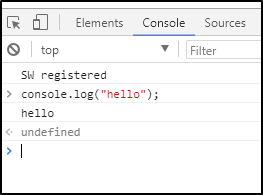
As we can see, the line just below console.log("hello"); displays the output (hello) of the command.
The line below that shows an arrow pointing to the left and undefined. This is the return value of the method that was run.
Execution Environments in the case of Multiple Tabs #
Each browser tab has its separate execution environment i.e., separate Execution Stacks containing separate Global Execution Contexts.
This means that in most cases the code in each tab is run completely separately, and the code in one tab cannot directly affect the code in another tab — or on another website.
This is a good SECURITY measure — if this were not the case, then bad actors could start writing code to steal information from other websites, and other such bad things.
Server-side vs. Client-side code #
The terms server-side and client-side code, are frequently heard especially in the context of web development.
-
Client-side code is code that is run on the user's computer — when a web page is viewed, the page's client-side code is downloaded, then run and displayed by the browser.
-
Server-side code on the other hand is run on the server, then its results are downloaded and displayed in the browser.
Examples of popular server-side web languages include PHP, Python, Ruby, ASP.NET.
JavaScript can also be used as a server-side language, for example in the popular Node.js environment.
Dynamic vs. Static code #
The word dynamic is used to describe both client-side JavaScript, and server-side languages — it refers to the ability to update the display of a web page/app to show different things in different circumstances, generating new content as required.
-
Server-side code dynamically generates new content on the server, e.g. pulling data from a database.
-
Client-side JavaScript dynamically generates new content inside the browser on the client, e.g. creating a new HTML table, filling it with data requested from the server, then displaying the table in a web page shown to the user.
The meaning is slightly different in the two contexts, but related, and both approaches (server-side and client-side) usually work together.
A web page with no dynamically updating content is referred to as static — it just shows the same content all the time
Data types in Javascript #
In Javascript, there are only 6 data types defined:
- the primitives (
boolean,number,string,null,undefined) - object (the only reference/non-primitive type)
string data-type #
Strings in JavaScript are actually objects with indices as keys and the corresponding characters as values for those keys.
Creating a string from other datatypes #
The String constructor is used to create a new String object.
When called instead as a function, it performs type conversion to a primitive string, which is usually more useful.
String function and String constructor produce different results:
1const a = new String("Hello world"); // a === "Hello world" is false
2const b = String("Hello world");     // b === "Hello world" is true
3
4a instanceof String;         // is true
5b instanceof String;         // is false
6
7typeof a // "object"
8typeof b // "string"
- Here, the function produces a string (the primitive type) as promised.
- However, the constructor produces an instance of the type
String(an object wrapper) and that's why you rarely want to use theStringconstructor at all.
Conversion into a string is useful for web crawling applications when we wish to convert URLs to strings and perform string manipulation methods like includes() on them.
Prototype and Static methods of the global String object #
String.prototype.includes() #
The includes() method performs a case-sensitive search to determine whether one string may be found within another string, returning true or false as appropriate.
undefined data type #
- A variable that has not been assigned a value is of type
undefined. - A method or statement also returns
undefinedif the variable that is being evaluated does not have an assigned value. - A function returns
undefinedif a value was not returned.
Objects #
Constructor function: Object()
This creates an empty instance of the global Object class.
Objects created are stored in Heap memory and they are accessed using references pointing to them.
An object persists in heap memory and is not garbage-collected, as long as there is a reference pointing to it.
Converting an Object to string type using toString() #
The JavaScript system invokes an object's toString() method, also referred to as its stringifier, to convert an object to a string whenever the object is used in a string context.
For example, an object is converted to a string when it is passed to a function that expects a string argument.
When you define a custom object in JavaScript, it is good practice to override the prototype toString() method, that the custom object inherits from Object, so that appropriate information about that object is conveyed.
If we do not, the object remains with the default toString() method from Object.
Displaying an Object #
We can pass any object to the console.log() method, which also expects a string as argument. So, console.log() implicitly calls an object's version of Object.toString() method to
Retrieving a reference to an Object from READ-ONLY properties of other objects #
Properties of objects can store references to other objects.
Now, these properties can also be READ-ONLY, to ensure that the reference of the same object stays stored, preventing accidental manipulation of the reference.
For example, a Navigator object can be retrieved using the READ-ONLY window.navigator property.
BUT, this doesn't mean that the Object itself is immutable. We can make changes to the Object using its reference.
Object Construction function #
TODO
Primitive Wrapper Objects #
Number wrapper object #
Number is a primitive wrapper object used to represent and manipulate numbers like 37 or -9.25.
Also, values of other types can be converted to primitive numbers, not Number objects, using the Number() function.
1let num1 = new Number(100);
2let num2 = new Number('100');
3
4let num3 = Number('100');
5let num4 = Number(100);
num1 and num2 are Number objects.
num3 and num4, created without using the new keyword, are primitive numbers.
Arrays #
Arrays are not a separate data type, rather they are instances of the global Array class, which is an instance of the global Object class.
The global Array class, like the global Object class, has some static methods as well as some prototype methods, defined within it's prototype which are inherited by created arrays, which are instances of the global Array class.
Structure of created array objects #
When we create an array, it is an instance of the global Array class from which it inherits methods.
It has indices starting from 0 as its keys, which have the elements at the corresponding indices as properties and another key called length which stores the number of elements of the array.
1let arr = ["a", "b", "c"];
The following array has a structure similar to this:
1arr = {
2    0: "a"
3    1: "b"
4    2: "c"
5    length: 3
6    [[Prototype]]: Array.__proto__
7}
1console.log(Object.keys(arr));
2console.log(Object.values(arr));
Accessing elements at specific indices of an array #
1arr.0; //invalid
2
3console.log(arr[0]); //valid
The first statement is invalid since identifies can't begin with numbers.
The second statement is valid.
What is an Array-like object? #
An Array-like object is an object that has a length property and properties indexed from zero, but it doesn't have Array's built-in methods like forEach() or map().
Some prototype/static methods of the global Array class #
Array.prototype.forEach() #
The forEach() prototype method executes a provided function (Arrow/Callback/Inline-callback) once for each array element.
Creating an array from other sequences using: Array.from() #
The Array.from() static method creates a new, shallow-copied Array instance from an iterable or Array-like object.
This is useful for converting Array-like objects (e.g. HTMLCollection) into arrays, in order to use prototype methods of the global Array object on them.
Statements in Javascript #
throw statement #
The throw statement throws a user-defined exception.
Execution of the current function will stop (the statements after throw won't be executed).
Read about it more on MDN.
Understanding the behaviour of for-of loop Statement #
The for of loop of Javascript allows looping over iterable data structures such as Arrays, Strings, Maps, NodeLists, etcetera.
Let us take two examples to understand how the for of loop works.
Taking a look at the first example:
 1
 2let cats_list_1 = ['Leopard', 'Serval', 'Jaguar', 'Tiger', 'Caracal', 'Lion'];
 3
 4let index1 = 0;
 5
 6for (let cat of cats_list_1) {
 7
 8    console.log((index1+1) + ". " + cats_list_1[index1]);
 9
10    if(index1 < cats_list_1.length) {
11        cats_list_1[index1] = 'Mannn';
12    }
13    index1++;
14
15    console.log(cat);
16    // See how this is same as the original array
17}
18
19console.log(cats_list_1);
20// As we can see, all elements of `cats_list_1` have been changed to 'Mann'
Since cat is assigned a copy of an element of cats_list_1, even if we modify the element at the same index position as assigned to cat, the variable cat will remain unchanged, unless we modify cat itself.
Output:
1. Leopard
Leopard
2. Serval
Serval
3. Jaguar
Jaguar
4. Tiger
Tiger
5. Caracal
Caracal
6. Lion
Lion
[ 'Mannn', 'Mannn', 'Mannn', 'Mannn', 'Mannn', 'Mannn' ]
Taking a look at the second example:
 1
 2let cats_list_2 = ['Leopard', 'Serval', 'Jaguar', 'Tiger', 'Caracal', 'Lion'];
 3
 4let index2 = 0;
 5
 6for (let cat of cats_list_2) {
 7
 8    console.log((index2+1) + ". " + cats_list_2[index2]);
 9
10    // The below IF condition is important to ensure the array is NOT extended.
11    if(index2 < cats_list_2.length - 1) {
12        cats_list_2[index2 + 1] = 'Mannn';
13        console.log(cats_list_2);
14
15    }
16    index2++;
17
18    console.log(cat);
19    // Notice how we can see 'Mann' the second element onwards.
20}
Here, we assign the value Mann to the second element onwards in the iteration before the value of cat is set using that index of the array, which is why see Mann as the output from the second iteration of the for of loop.
Output:
1. Leopard
[ 'Leopard', 'Mannn', 'Jaguar', 'Tiger', 'Caracal', 'Lion' ]
Leopard
2. Mannn
[ 'Leopard', 'Mannn', 'Mannn', 'Tiger', 'Caracal', 'Lion' ]
Mannn
3. Mannn
[ 'Leopard', 'Mannn', 'Mannn', 'Mannn', 'Caracal', 'Lion' ]
Mannn
4. Mannn
[ 'Leopard', 'Mannn', 'Mannn', 'Mannn', 'Mannn', 'Lion' ]
Mannn
5. Mannn
[ 'Leopard', 'Mannn', 'Mannn', 'Mannn', 'Mannn', 'Mannn' ]
Mannn
6. Mannn
Mannn
Web APIs in Javascript #
The functionality built on top of the client-side JavaScript language are so-called Application Programming Interfaces (APIs) provide you with extra powers to use in your JavaScript code.
They are ready-made sets of code building blocks that allow a developer to implement programs that would otherwise be hard or impossible to implement.
Taking the example of introducing a delay in the execution of a particular piece of Javascript code, it is NOT possible using just Javascript this because the Execution Stack of any JS engine instantly executes code contained within any Execution Context in the stack.
For this, we would use the window.setTimeout() or setTimeout() method (because window is the global object in the case of browsers) accessible to us through the Window API, which would keep track of the time passed.
There are two types of APIs:
-
Browser APIs are built into your web browser, and are able to expose data from the surrounding computer environment, or do useful complex things.
For example:
HistoryAPI,ClipboardAPI, etc. -
Third party APIs are not built into the browser by default, and you generally have to grab their code and information from somewhere on the Web.
For example: Twitter API
Let us now take a look at some Browser APIs.
NOTE: Some these APIs like
consoleandsetTimeoutare also present in the Node JS runtime environment.Although these APIs might provide the same functionality in Node and the browser, their internal implementation might be very different.
Console API #
A console traditionally refers to a computer terminal where a user may input commands and view output such as the results of inputted commands or status messages from the computer.
The Console API provides functionality to allow developers to perform debugging tasks, such as logging messages or the values of variables at set points in your code, or timing how long an operation takes to complete.
All modern browsers have a web console for debugging.
-
In the case of node,
consoleis a defined object, which is why we can execute its methods along with the prefixconsolein node locally. -
In web browsers, it is a property of the global
windowobject.This is why we can use the prefix
windowlikewindow.consoleor directly access it in web browsers, since they havewindowcontext.
console.log(<arg>) method #
The console.log() method is used to write messages to this console. For example:
1let greeting = "hello";
2console.log(greeting);
console.log() makes it easier to see the value inside a variable. That's why it's commonly used for testing/debugging code.
console.trace() method #
The console.trace() method outputs a stack trace to the Web console.
It gives a list of the Execution Contexts in the Execution Stack, as well as a record of asynchronous calls already placed / yet to be placed in the Callback Queue.
The output is similar to this:
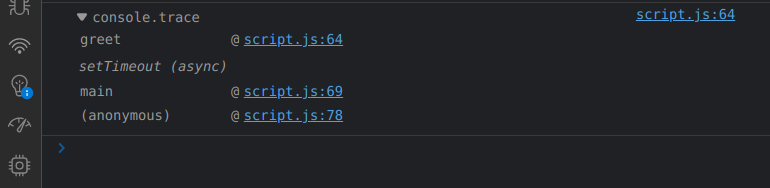
Learn more about stack tracing using console.trace() below.
console.warn(<arg>) and console.error(<arg>) method #
console.warn()method outputs a warning message to the Web browser's console.console.error()method output an error message to the Web browser's console. An example of both is shown below.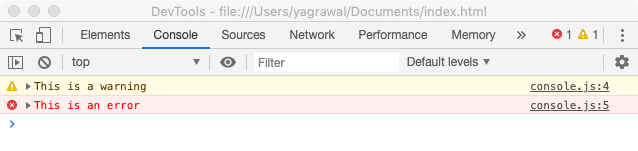
console.time(<arg>) and console.timeEnd(<arg>) #
The console.time() method starts a timer we can use to track how long an operation takes.
Each timer is given a unique name.
When we call console.timeEnd() with the same name, the browser will output the time, in milliseconds, that elapsed since the timer was started.
Input:
1console.time("Your code took");
2console.log("Hello World");
3console.timeEnd("Your code took");
Output:
Your code took: 4.3919237898ms
console.table(<arg>) method #
This method displays the keys and values of the object passed to it in tabular form.
console.clear() method #
This clears the Browser's console.
Window API #
The Window API is used to obtain information about and manipulate the browser-window.
In the case of browsers, the Global Execution Context has its global/this object as window, which represents the browser window in which the script is running, typically on the client side.
Since it is a global object, its methods and properties can be directly accessed, without having to use the prefix window.
It only works in browsers and not in regular scripts running locally using node, because only browsers have window context.
In node, accessing window is meaningless because there's no browser window.
Usage of window.console object #
window.console returns a reference to the console object which provides access to the browser's debugging console.
In simple words, it checks if the console is available(truthy value) so that we can log next.
In the case of mobile browsers or general code editors, they don't support debugger/console).
Try running this in your browser's console:
1if( window.console ) {
2    window.console.log( open_date );
3};
Useful properties of the window object #
window.innerWidth #
The read-only Window property innerWidth returns the interior width of the window in pixels. This includes the width of the vertical scroll bar, if present.
window.innerHeight #
The read-only innerHeight property of the window interface returns the interior height of the window in pixels, including the height of the horizontal scroll bar, if present.
window.scrollX #
The read-only scrollX property of the Window interface returns the number of pixels that the document is currently scrolled horizontally.
TODO: Difference between Window interface and global Window object
window.scrollY #
The read-only scrollY property of the Window interface returns the number of pixels that the document is currently scrolled vertically.
window.document #
More details under DOM (Document Object Model)
Other methods of window object #
These methods only work on browsers since only browsers have the pre-existing global window object.
We can choose to use these methods without the window prefix because, as mentioned previously, browsers have window context.
Note that there should be no locally defined function with the same name, otherwise just using the method name would lead to the local function being called.
This is why it is safer to use the methods along with the prefix of window to ensure selection of the correct function definition.
window.prompt() or prompt() #
TODO
window.confirm() or confirm() #
TODO
window.alert(<arg>) or alert(<arg>) #
The alert() method displays an alert box with a message and an OK button.
The alert box takes the focus away from the current window, and forces the user to read the message.
For example:
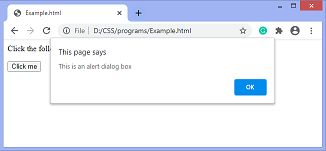
Note that this is not used nowadays. Instead, we use Bootstrap etc, to show beautified alerts.
History API #
The History API exposes useful methods and properties that let you navigate back and forth through the user's history, and manipulate the contents of the history stack.
We are given access to it through the Window API.
the window.history read-only property returns a reference to the History object (i.e., the history key of the window object has value as the reference to the History object), which provides an interface for manipulating the browser session history.
Note that the history refers to the pages visited ONLY in the tab or frame that the current page is loaded in.
It is also referred to as the History API in sources like MDN, since History object is used to get the session history of the user back to the application made using JavaScript, for manipulation.
window.history.length #
window.history.back() or window.history.forward() or window.history.go() #
Moving backward and forward through the user's history is done using the back(), forward(), and go() methods.
-
To move backward through history:
window.history.back(). This acts exactly as if the user clicked on theBackbutton in their browser toolbar. -
To move forward:
window.history.forward(). This acts exactly as if the user clicked on theForwardbutton in their browser toolbar. -
To move to a specific point in history:
window.history.go(integerVal)loads a specific page from session history.The current page's position is 0 and an integer value relative to the current page has to be passed. For example, we can move forward one page by passing 1.
Location API #
The Location API is used to access various details about the current page such as host, hostname, URL, pathname, etcetera.
We are given access to it through the Window API.
The window.location read-only property returns a reference to the Location object ((i.e., the location key of the window object has value as the Location object)), with information about the current location of the document.
It represents the current URL of the document being displayed in that window.
Though window.location is a read-only Location object, we can also assign a string to it.
This means that you can work with location as if it were a string in most cases: location = http://www.example.com is a synonym of location.href = http://www.example.com. But the latter is preferred.
window.location.href vs. window.location.assign vs. window.location.replace() #
All three commands are used to redirect the page to another page/website but differ in terms of their impact on the browser history, safety and return values.
window.location.href property #
It is a property of window.location that stores the URL of the current webpage.
On changing the value of href property, a user would be navigated to a new URL, i.e. sent to a new webpage.
It adds an item to the history list, so that the user can return to the current page upon clicking the Back button.
It is faster than using the assign() method as calling a function is slower than changing the value of the property.
window.location.assign() method #
It is a property of window.location that stores a function expression.
The assign function is also used to navigate to a new URL. But it is preferred over updating the href property as calling a function is considered safer and more readable.
However, it does not show the current location, it is only used to go to a new location.
The assign() method is also preferred over href as it allows the user to mock the function and check the URL input parameters while testing, instead of directly assigning a faulty URL to the href property.
Unlike the replace method, the assign method adds a new record to history so that the user can return to the current page upon clicking the Back button.
window.location.replace() method #
It is a property of window.location that stores a function expression.
It is used to navigate to a new URL without adding a new record to the history.
The user won't be able to navigate back to the current page upon clicking the Back button.
window.location.reload() #
The reload() method reloads the current document. It is the same as clicking the reload button in your browser.
window.location.toString() #
The window.location.toString() OVERRIDEN definition of Object.prototype.toString of the Location interface returns a string containing the whole URL. It is a read-only version of window.location.href.
Clipboard API #
The Clipboard API adds to the Navigator interface, the read-only clipboard property, which returns the Clipboard object used to read and write the clipboard's contents.
Mutation Observer API #
This API is implemented by the MutationObserver interface, and it provides the facility of invoking a callback function in reaction to the changes being made to the DOM tree.
Interfaces (Not available in JavaScript) #
History Interface #
The History interface allows manipulation of the browser session history (that is, the pages visited in the tab or frame that the current page is loaded in).
Navigator Interface #
The Navigator interface represents the state and the identity of the user agent.
It allows scripts to query it and to register themselves to carry on some activities.
A Navigator object can be retrieved using the read-only window.navigator property.
Clipboard Interface #
The Clipboard interface implements the Clipboard API, by providing—if the user grants permission—both read and write access to the contents of the system clipboard.
The Clipboard API can be used to implement cut, copy, and paste features within a web application.
The system clipboard is exposed through the GLOBAL Navigator.clipboard property.
MutationObserver Interface #
The MutationObserver interface implements the Mutation Observer API by providing the ability to watch for changes being made to the DOM tree.
Prototypes #
TODO
Variable and Constant values #
let & var keywords for variables #
-
letis block-scoped, sa variable declared withletcan only be access inside a block of code.varis function-scoped, so a variable declared inside a function withvarcan be used anywhere within a function. -
letdoes not allow to redeclare variablesvarallows to redeclare variables.1let blockScope = 5; // 5 2let blockScope = 3; // error 3 4var funcScope = 5; // 5 5var funcScope = 3; // 3
It would be better to use let when defining variables since both let and const have block-level scope, so resolving scopes would be easier and consistent.
Note that there are also differences in how let and const variables are Hoisted. The concept of Temporal Dead Zones is also important in differentiating these.
let and const also aren't automatically members of the window object in Browser JS Engines, which is the case in variables declared using var.
Example for understanding the difference between let and var #
-
The following code-snippet uses the
varkeyword.1var a = 0; 2if(true){ 3 var a = 1; 4 // `a = 1` would have yielded the same result. 5 6 console.log(a); 7} 8console.log(a);We know that
varvariables are function-scoped, so the entire snippet belongs to the same scope.Also,
varallows for re-declarations of variables, which is why no error is thrown in re-declaringawithin the if-statement, which is in actuality the same scope.So, when we assign value for
aas1within the if-statement,ais changed for the entire function-scope, which is why the output has two 1s.Output:
1 1 -
The following code-snippet uses the
letkeyword.1let b = 0; 2if(true){ 3 let b = 1; 4 console.log(b); 5} 6console.log(b);We know that
letvariables are block-scoped, so the scope is different INSIDE & OUTSIDE the if-condition.So, the declaration of
bINSIDE the if-condition is local to that block and it is destroyed upon exiting the block, which is why the first value is 1 and the second value is 0.Note that we could also have considered the outside block as the main block, with the whole code being considered as ONE block.
Output:
1
0
Note that C & C++ are block-scoped. The following C++ code-snippets replicate this behavior:
- Replicating behavior of
var1 int main() { 2 int a = 0; 3 if(true){ 4 a = 1; 5 // `a` from the OUTER scope is modified. 6 printf("%d\n", a); 7 } 8 printf("%d\n", a); 9 } - Replicating behavior of
let1 int main() { 2 int a = 0; 3 if(true){ 4 int a = 1; 5 // new `a` created, which has scope within 'if'. 6 // It is destroyed as soon as scope of 'if' gets over 7 printf("%d\n", a); 8 } 9 printf("%d\n", a); 10 }
const keyword for CONSTANT variables #
Values defined using const have block-level scope.
If you are sure that the value of a variable won't change throughout the program, it's recommended to use const so as to prevent any errors later on due to changing on variables not meant to be changed.
Note that it isn't possible to declare constants without initializing them. This is an example of erroneous code:
1const x;  // Error! Missing initializer in const declaration.
2x = 5;
3console.log(x)
This is correct:
1const example_2 = "yo";
2console.log(example_2);
Temporal Dead Zone #
The let and const variables are Hoisted but they aren't even initialized with the undefined spatial placeholder like var is, so trying to access them before they are initialized, in the code execution phase throws an error of this sort:
Uncaught ReferenceError: Cannot access 'a' before initialization
The phase between the starting of the execution of block in which the let or const variable is declared till that variable is being initialized is called Temporal Dead Zone for the variable.
So, it is BEST PRACTICE to keep variable declarations and initializations at the TOP of blocks to avoid unwanted Errors.
Different Storage Location for let and const variables #
The variables declared using let and const keywords aren't automatically members of the GLOBAL window object in Browser JS Engines, like variables declared using var are.
Considering the following code-snippet:
1var a = 10;
2
3let b = 10;
4
5if(true) {
6    let c = 20;
7}
If we take a look at the Browser Console while the control is inside the if-block, we see something like this:
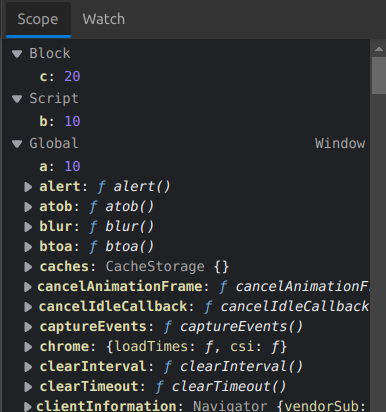
- Note how
ais stored under the GLOBALwindowobject, represented asGlobal. - The variable declared using
letOUTSIDE if-block, which isbis under something calledScriptscope. - The variable declared using
letINSIDE if-block, which iscis under something calledBlockscope, representing the fact that its scope lies inside an if-BLOCK.
This is a practical explanation of why a, declared using var keyword, can be accessed using window.a, and why b and c, which were declared using let keyword, CANNOT.
Are function parameters var or let variables? #
let and const are relatively new features in the language, they were added in EcmaScript 6.
Prior to this, all variables were either global or local to the function.
In the function body we declare local variables with var, but function parameters are automatically local so there's no need for a keyword to distinguish them from global variables.
In a sense, function parameters can be thought of as variables local to the function declared using the var
keyword.
Accessing global variables of the same name as local variables #
NOTE: The creation of GLOBAL variables in Node JS is slightly different from Browser JS Engines.
-
When we create any variable in the global execution context of browsers, it automatically becomes a member of the
windowobject. These GLOBAL variables can be accessed even by prefixingwindowor without prefixingwindow, as discussed in the Window API.1var globVar = 1; // Browser JS Engine 2 3console.log(globVar); 4console.log(window.globVar); // Both work -
In order to create GLOBAL variables in Node, we need to use the
globalprefix. Although after creation, they can even be used without theglobalprefix. However, it is BAD PRACTICE to useglobalvariables so we don't use these often.1global.globVar = 1; // Node JS 2 3console.log(globVar); 4console.log(global.globVar); // Both work
Global Execution Context as a Function Scope #
Variables created using var keyword are function-scoped.
We know that scripts are placed in ANONYMOUS functions before calling them to make them run. So, the global execution context in Browser JS Engines or Node is actually a function scope.
So, the variables declared using var in the global execution context are available everywhere for the entire run-time of the program, since the global ANONYMOUS function scope is everywhere.
Take a look at this code-snippet for Browser JS Engines:
 1var x = 1;
 2
 3console.log(x);
 4
 5function funcA() {
 6    var x = 10;
 7    console.log(x);
 8    console.log(window.x);
 9}
10
11funcA();
Output:
10
1
As mentioned above, GLOBAL scope variables in Browsers are automatically properties of the GLOBAL object window of the global execution context of a particular script, which is why we are able to access the global variable x using window.x, instead of the local variable x.
A somewhat similar logic would also apply for Node.
Values vs. References in Javascript #
Javascript has 5 data types that are passed by value: Boolean, null, undefined, String, and Number. We’ll call these primitive types.
Javascript has 3 data types that are passed by reference: Array, Function, and Object. These are all technically Objects, so we’ll refer to them collectively as Objects.
TODO : Complete
Functions in Javascript #
In javascript, functions are also objects.
There is a global Function class which has static as well as prototype methods.
We know that an object persists in heap memory and is not garbage-collected as long as there is a reference to it.
NOTE: This is the concept seen in Closures, where a function defined inside another function is still able to access the variables of the outer function, even when the scope of the outer function is over.
This is due to the fact that the closure of the inner function stores a reference to its lexical environment (which is the outer function).
First-class Functions #
A programming language is said to have First-class functions when functions in that language are treated like any other variable.
For example, Javascript is said to have First-class functions since:
- functions can be passed as an argument to other functions.
- can be return by another function
- can be assigned as a value to a variable.
Function DECLARATION vs Function EXPRESSION #
The main difference between a Function DECLARATION and a Function EXPRESSION is of Hoisting.
a. Function DECLARATION #
1function functionName(paramA, paramB) {
2    // Set of statements
3}
A function declaration also known as a function statement declares a function with a function keyword.
The function declaration must have a function name, it cannot be ANONYMOUS.
Due to hoisting, it can be called before its definition is reached in the code execution phase, because the definition is already stored in the execution context in the memory allocation phase.
For example:
1yo(); // Function INVOKATION
2
3function yo(){
4    console.log("This is a functional declaration");
5};
b. Function EXPRESSION #
A function EXPRESSION, in simple terms, is just a function DECLARATION without the function identifier name, but it CANNOT be used like a function DECLARATION
For instance, this will give a syntax error:
1function () {
2  console.log("Hello");
3}
Output:
SyntaxError: Function statements require a function name
Instead, Function Expressions are used by be assigning them to variables/keeping them as property values in Javascript.
NOTE: If we specify a name for the Function getting stored in a variable, it is known as Named Function Expression.
However, Function EXPRESSIONS don't have the advantage of Hoisting that Function DECLARATIONS do.
This is because only variable declarations are hoisted, not variable initializations.
Since the value of variables contain function expressions, the function itself is not accessible before the initialization of the variable storing it takes place.
For calling the function expression, we just use the name of the variable it is stored in followed by arguments.
For example:
1var variableName = function (paramA, paramB) {
2    // Set of statements
3};
4
5variableName(valueA, valueB);
OR
1const objectName = {
2  funcEx:  function (paramA, paramB) {
3            // Set of statements
4  },
5  key1: value1
6};
7
8objectName.funcEx(valueA, valueB);
They can also be used in IIFEs (which function declarations can be too but it is more appt. to use function expressions).
Trying to call the function definition of a Named Function Expression #
Consider the following code-snippet:
1var funcExpression = function bar() {
2  console.log("hello");
3}
4
5bar();
This will throw an error saying bar is not defined because the definition of bar is not in the scope from where we are trying to call it.
Because the name bar is used within a function expression, it doesn't get declared in the outer scope.
With named function expressions, the name of the function expression is enclosed within its own scope.
arguments object #
arguments is an Array-like object accessible inside functions that contains the values of the arguments passed to that function.
For example:
 1function func1(a, b, c) {
 2  console.log(arguments[0]);
 3  // expected output: 1
 4
 5  console.log(arguments[1]);
 6  // expected output: 2
 7
 8  console.log(arguments[2]);
 9  // expected output: 3
10}
11
12func1(1, 2, 3);
No Parameters vs. Default Parameters #
In JavaScript, function parameters default to undefined data type, if no parameters are provided.
Suppose we have the following code:
1function print_message(message) {
2console.log("Message is : " message);
3};
4print_message();
The output would be:
Message is : undefined
However, it's often useful to set a different default value. This is where default parameters can help.
1function functionName(param = defVal) {
2// function body
3};
Here defVal is the default value for the argument param.
Function Overriding in Javascript #
JavaScript supports overriding, not overloading.
When you define multiple functions that have the same name, the last one defined will override all the previously defined ones and every time when you invoke a function, the last defined one will get executed.
-
Here is an example of overriding a user-defined function:
 1<script type="text/javascript">
 2    function multiplyNum(x, y, z) {
 3        return x * y * z;
 4    }
 5
 6    function multiplyNum(x, y) {
 7        return x * y;
 8    }
 9    var result = multiplyNum(1, 2, 3);
10    document.write(result);
Output
2Looking at the above example, the value of multiplication will be equal to 2 instead of 6.
In this case, the only function available is
multiplyNum(x, y). So if we think we are making a call tomultiplyNum(x, y, z), it's actually callingmultiplyNum(x, y).The remaining parameter(s) will be ignored.
-
Here is an example of overriding the in-built
alert()function:1<script type="text/javascript"> 2 var alert = function(message) { 3 document.write(message); 4 } 5 // The following calls will invoke the overridden alert() function 6 alert("Learn "); 7 alert("JavaScript"); 8</script>Output:
Learn JavaScriptBy default,
alert()function displays the message in the alert box. But here we have overridden it. Now it is displaying the message in thedocument.
Higher-order Functions #
A higher-order function is a function that accepts functions as parameters and/or returns a function.
Take a look at the following example:
 1const radius = [3, 1, 2, 4];
 2
 3// outputArrayGen is a higher-order function
 4function outputArrayGen(radiusArray, callbackFn) {
 5    const output = [];
 6    for(let index = 0; index < radiusArray.length; index++) {
 7        output[index] = (callbackFn(radiusArray[index]));
 8    }
 9
10    return output;
11}
12
13area = function(radius) {
14    return (Math.PI * radius * radius);
15}
16
17circumfrence = function(radius) {
18    return (2 * Math.PI * radius);
19}
20
21diameter = function(radius) {
22    return (2 * radius);
23}
24
25
26console.log(outputArrayGen(radius, area));
27console.log(outputArrayGen(radius, circumfrence));
28console.log(outputArrayGen(radius, diameter));
call method of 'global Function class' #
TODO
this object of functions #
'this' object of a function is by-default 'undefined'.
We can manipulate its properties etc and use it to create more objects with the help of constructor functions.
Immediately Invoked Function Expression (IIFE) #
IIFE, Immediately Invoked Function Expression, is a JavaScript function that runs as soon as it is defined.
It is a design pattern which is also known as a Self-Executing Anonymous Function and contains two major parts:
-
The first is the function expression (no-name function).
Note that we can provide a named function (FUNCTION DEFINITION) over here as well with lexical scope enclosed within the Grouping Operator
().Even though we can use both function definitions and expressions in IIFEs, we should use definitions anyway to make our code more readable.
Meaning of lexical scope #
The ability where the inner function can access the parent function scope is known as lexical scope.
This prevents accessing variables within the IIFE idiom as well as polluting the global scope.
-
The second part creates the immediately invoked function expression () through which the JavaScript engine will directly interpret the function.
For example:
1(function IIFE() {
2    console.log("This is an IIFE");
3    //variables defined here can't be accessed outside but they can be accessed by functions defined inside this function.
4    })() // the function is immediately invoked
Check out 20B-IIFE.js for an example implementation of IIFEs.
Use-case of an IIFE #
-
When we don't want to re-use the code of the function and don't want to add to the already extensive global namespace, so the functions of an
IIFEcan't be called externally.This is why we can use function expressions (no-name functions) since we don't have to call it later on.
However, we can still name it (use function declaration) in order to organize our code.
- It is a common pattern for creating local scopes.
General information about Javascript #
Template literals and string interpolation in Javascript #
TODO
Ending statements with semi-colons #
Although ending statements (NOT BLOCKS of code like if-else) with semi-colons is optional in JavaScript, it is best practice to do so in order to avoid any edge-case behaviour where statements place on two different lines are interpreted together.
Hoisting #
Hoisting in JavaScript refers to the process whereby the interpreter APPEARS to move the declaration of functions, variables of type var, or classes to the top of their scope, prior to execution of the code.
Note, JavaScript only hoists declarations, not initializations!
This means that initialization doesn't happen until the associated line of code is executed, even if the variable was originally initialized then declared, or declared and initialized in the same line.
Until that point in the execution is reached the variable has its default initialization (undefined for a variable declared using var, otherwise uninitialized).
To summarize...
-
function declarations are already in memory, ready to be called, before the execution of the code starts.
-
variables of type
varare allocated memory and assigned the spatial placeholder value ofundefined. -
variables of type
letandconstare uninitialized (NOT even the spatial placeholder value ofundefined).Read about Temporal Dead Zones for in-depth understanding of these cases.
-
TODO:
However, this seems like quite an abstract concept.
A practical explanation of how Hoisting works can be obtained by reading about Phases of Execution Contexts
Closures #
A Closure is a function bundled together (enclosed) with references to its Lexical Environment.
In other words, a closure gives us access to an outer function's scope from an inner function.
A closure in JavaScript is like keeping a reference (NOT a copy) to the scope at the point of function declaration, which in turn keeps a reference to its outer scope, and so on, all the way to the global object at the top of the scope chain.
NOTE: Variables themselves are visible from within a closure, not copies.
So, any mutation operations on the variables within the function change their values for future calls as well.
A closure is created when a function is declared; this closure is used to configure the execution context when the function is invoked.
Even in the case of functions declared the global scope, we know that a Javascript file itself is kept inside an anonymous function and called, in most Javascript runtime environments.
So any function declared and called in the global scope (scope of the anonymous function) is closed by that anonymous function.
Uses of Closures #
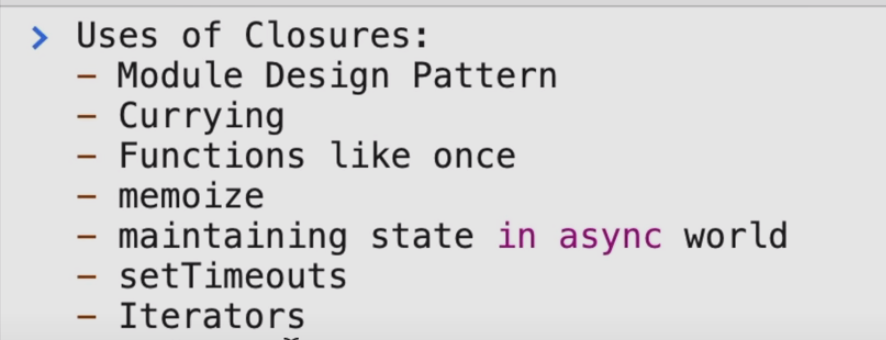
Examples for understanding Closures #
First Example #
-
The following is an example of a Closure :
 1function main() {
 2    var x = 1;
 3
 4    function nested() { // closed by 'main'
 5        console.log(x);
 6    }
 7
 8    return nested;
 9}
10
11var fn = main();
12// The closure of 'nested' stored in this variable
13
14fn();
The function
nestedcan access the the scope of the functionmain. -
Let's add some complexity to the above code-snippet:
 1function main() {
 2    var x = 1;
 3
 4    function nested() {
 5        console.log(x);
 6    }
 7
 8    x = 100;
 9
10    return nested;
11}
12
13var fn = main();
14
15fn();
Here, since the function
nestedhas access to the lexical environment ofmain, and the value of the variablexis changed to100before thereturnstatement is reached, the value ofxis changed to 100 for all future calls tonested.So, the output of this would be
100.
Second Example (Helpful for understanding how stack tracing works) #
We have to understand that the fact that a particular function, for example, nested is constructed inside of another function main and closes over some of its variables, is insignificant to what functions are displayed in the execution stack when nested is called.
This is because the execution stack doesn't care where the values are defined.
The only thing that the execution stack cares about is, when function nested is executed, which function's execution caused it.
-
Take a look at the first code-snippet:
11 function main() {
22   function nested() {
33       console.trace();
44   }
55   nested();
66 }
77
88 const fn = main();
At line 8,
top-levelcallsmain, which callsnested(At line 5 of the definition ofmain).Because of this, the stack trace of this code looks like this:
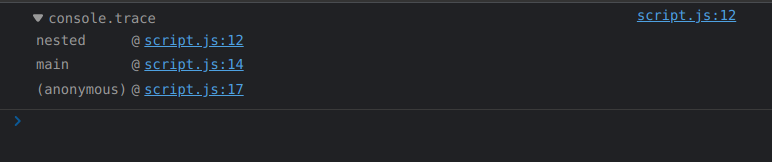
-
The second-code snippet is slightly different:
11 function main() {
22   function nested() {
33     console.trace();
44   }
55   return nested;
66 }
77
88 const fn = main();
99 fn()
At line 8, top-level calls
main.At line 9 top-level directly calls
fn, a.k.anested.Because of this, the stack trace of this code looks like this:
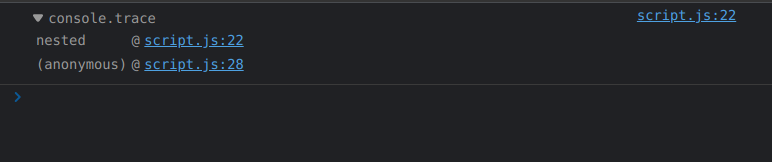
Javascript Engines #
A JavaScript engine is a software component that executes JavaScript code.
The first JavaScript engines were mere interpreters, but all relevant modern engines use just-in-time compilation for improved performance.
JavaScript engines are typically developed by web browser vendors, and every major browser has one.
In a browser, the JavaScript engine runs in concert with the rendering engine via the Document Object Model.
The use of JavaScript engines is not limited to browsers. For example, the V8 engine is a core component of the Node.js and Deno runtime systems.
Execution Contexts in Javascript #
Simply put, an Execution Context is an abstract concept of an environment where the Javascript code is evaluated and executed.
Whenever any code is run in JavaScript, it’s run inside an Execution Context.
Lexical Environment & Scope Chain #
Every execution context has a reference to its outer environment, and that outer environment is called Lexical Environment.
NOTE: The Lexical Environment of a function is the combination of the function's Execution Context and the reference to the Lexical Environment of its PARENT.
Also, by PARENT, we mean the Lexical PARENT i.e., the location where the function declaration sits, NOT where the function was CALLED from.
JavaScript cares about the Lexical Environment when you ask for a variable while running a line of code inside any particular execution context if it can’t find that variable in its block, it will go to the outer reference and look for variables there.
So we can say that whenever a execution context is created, along with it a lexical environment is created.
Suppose a function is called. Now, any other functions called within THAT function will have access to the lexical environment of THAT function through a reference.
NOTE: Observe that because a reference to the lexical environment is stored, any changes to the variables of the lexical environment are updated for future calls of the function.
If a chain of references to Lexical Environments is formed, it is known as Scope Chain.
Consider the following code-snippet:
 1function two(){
 2  console.log(a);
 3}
 4
 5function one(){
 6  var a = 2;
 7  console.log(a);
 8  two();
 9}
10
11var a = 1;
12console.log(a);
13one();
Due to hoisting, the functions one and two will have their definitions stored during the creation phase, and the declaration of the variable a will also be present.
During the code execution phase:
awill get the value1.- The
logmethod will try to displaya. The global execution context has the variableawith value1, so1will be logged. - The function
onewill be called.-
Within the execution context of
one, a local variable with nameawill get value2. -
The
logmethod will try to displaya. The execution context ofonehas the variableawith value2, so2will be logged. -
The function
twowill be called.- The
logmethod will try to displaya.
Since the execution context of
twodoesn't have the variablea, it will check the reference to the Lexical Environment of its parent, which is the global execution context.Since the global execution context has the variable
awith value1,1will be logged. - The
-
So, the output of the code-snippet is:
1
2
1
Note that the following C++ code also behaves in a similar manner. It has some slight changes since any phenomenon similar to Hoisting isn't available in C++.
 1int a = 1;
 2
 3// two() will print 1 since that is in its outer scope and no local 'a' variable.
 4void two(){
 5  cout << a << endl;
 6}
 7
 8// one() will print 2 since that is in it scope.
 9void one(){
10  int a = 2;
11  cout << a << endl;
12  two();
13}
14
15// main() will print 1 since that is in its outer scope and no local 'a' variable.
16int main() {
17    cout << a << endl;
18    one();
19    return 0;
20}
Output:
1
2
1
Phases of Execution Contexts #
Each Execution Context has two phases: creation phase and execution phase.
Read a summary of both below or for more in-depth understanding, check out an example here.
Creation Phase #
During the creation phase, the JavaScript engine performs the following tasks:
-
Setup a memory heap for storing variables and function references.
-
Store the function declarations in the memory heap.
So, the function declarations are already in the memory even, ready to be called, even before the code is executed.
-
Also, store variables within the global execution context with the initial values as
undefined.
Steps 2 and 3 are practical examples of Hoisting.
Execution Phase #
After the Creation Phase, the execution context moves to the Execution Phase.
During the execution phase, the JS engine executes the code line-by-line, assigns the values to variables, and executes the function calls.
For each function call, the JS engine creates a new function execution context.
Types of Execution Contexts #
There are two types of Execution Contexts in Javascript:
- Global Execution Context
- Functional Execution Context
But, before looking at these in detail, we must understand how the Execution Stack works in Javascript:
Working of Execution Stack in Javascript #
Execution stack, also known as “calling stack” in other programming languages, is a stack which is used to store all the execution contexts created during the code execution.
When the JavaScript engine first encounters your script, it creates a global execution context and pushes it to the current execution stack.
Whenever the engine finds a function invocation, it creates a new execution context for that function (function execution context).
HOWEVER, note that all the execution contexts of functions also have access to the Lexical Environment of the execution context inside which they are DEFINED (not inside which they are CALLED).
The engine executes the function whose execution context is at the top of the stack, line-by-line.
When this function completes, its execution context is popped off from the stack, and the control reaches to the context below it in the current stack.
Stack Tracing using console.trace() method #
In computing, a stack trace is a report of the active stack frames at a certain point in time during the execution of a program.
In the case of Browser JS engines, we use the console.trace() method for this purpose.
There are some things we need to understand when tracing:
-
The only thing that the execution stack cares about is, when a function is executed, which function's execution CAUSED it.
The location of the definition of the function does NOT matter.
The second example given under Closures demonstrates this concept.
-
As mentioned later, under
In the case of Asynchronous calls, we know that all synchronous calls are executed before them and all execution contexts are popped from the execution stack, before the event queue pushes the context of the asynchronous call into the execution stack.
Still, the dev-tools of your browser do keep track of the initial call stack (functions inside which the asynchronous call was made).
They then REBUILD it for your convenience when you call
console.trace()as shown in the output of the example BELOW.But the initial synchronous function calls are not on the stack anymore.
Take a look at the following example:
 1function func() {
 2        console.trace();
 3    }
 4
 5function main() {
 6
 7    func();
 8
 9    setTimeout(func, 0);
10
11    console.log("End of main");
12}
13
14main();
15
16console.log("One last command");
Here, BOTH a synchronous as well as an asynchronous call to a function
funcis made inside an outer functionmain(this can be done BECAUSEfuncis actually accessible in the scope ofmain).In this case, the whole body of
mainwould be executed first, along with the popping of the execution contexts of ANY synchronous calls (such as the synchronous call tofunc) made inmain.Also, commands in the Global Execution Context would be executed.
After that, the asynchronous call to
funcwould be executed.Take a look at the stack trace of this code-snippet obtained using
console.trace():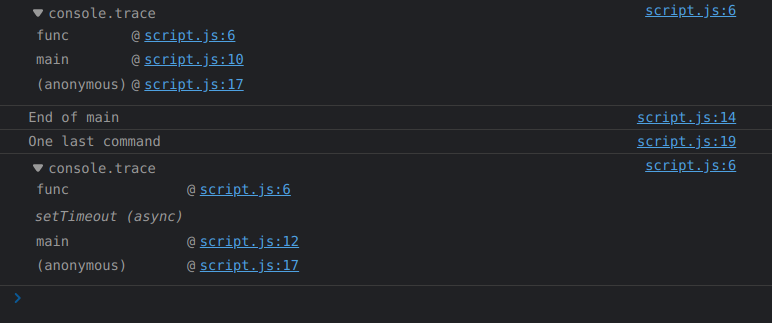
-
Observe how the
console.trace()inside the asynchronousfunccall is only reached afterOne last command, in the global execution context, is logged. -
Notice the difference between the stack trace of the synchronous and asynchronous call.
Both calls occur from the same place, but in the case of the asynchronous one, the (async) suffix explicitly marks where the "real" stack ends.
The functions after the (async) suffix aren't actually in the Execution Stack, but the stack is still re-built by the browser dev-tools.
It's shown because the browser thinks that if you need the trace, it's more because you want to know where the call came from in your code, rather than what was really on the internal call stack.
After all the goal is to be useful to the developers.
-
Global Execution Context #
This is the default or base execution context. The code that is not inside any function is in the global execution context.
It performs two things:
- it creates a global object
windowin case of Browser JS Engine.globalin case of Node JS.
- sets the value of
this-
Equal to
windowin case of Browser JS Engine. -
Equal to
module.exportsin case of Node JS.module.exportscan be used to export functions, objects, and their references from one JS file and can use them in other JS files by importing them byrequire()method.The object
globalcan be accessed usingglobalThiskeyword orglobalitself.
-
There can only be one global execution context in a program.
NOTE: The global execution context has a reference to the Lexical Environment outside it, pointing to NULL.
In the case of execution of asynchronous functions, the callback queue waits for all contexts (except for the context in which the asynchronous call was made) to be popped from the Execution Stack, before executing the asynchronous function calls present in the callback queue.
Take a look at this code snippet:
1var n = 10;
2
3function callBackfunc() {
4    console.log(n);
5}
6
7
8setTimeout(callBackfunc, 0);
The output is:
10
This is possible since the asynchronous call was made in the global execution context of the file, so the callback queue doesn't wait for the global execution context to be popped from the Execution Stack.
If the global execution context had ACTUALLY been popped from the Execution Stack, we would have got a ReferenceError saying that n is not defined.
Function Execution Context #
Every time a function is invoked, a brand new execution context is created for that function.
-
The function execution context is similar to the global execution context.
But instead of creating the global object, the JavaScript engine creates the
argumentsobject as the function execution context's global object.So, instead of having to access the values of the parameters/arguments of the function call with the prefix
argumentslikearguments.parameter1, we can directly accessparameter1becauseargumentsis the global object. -
But, just like the global execution context, the
thisobject of the function execution context is set to the global object of the global execution context.
There can be any number of function execution contexts.
In Browsers, (Global Execution Context) is a (Function Execution Context) #
In the case of Browser JS engines, the global execution context is also a function execution context.
This is confirmed by executing the console.trace() method in the global scope of a Javascript file running in a Browser.
The following output is shown in the Browser console:
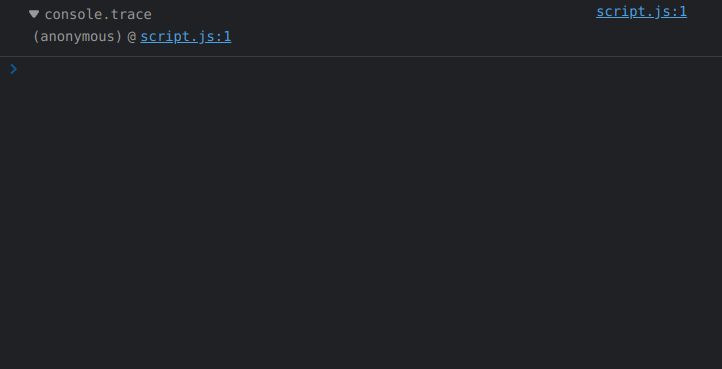
See how there is an anonymous function listed. This is the main execution thread of the page.
So, we can conclude that Javascript files are put inside anonymous functions in the case of browser JS engines and those functions are called instead.
Asynchronous Programming in Javasript #
Synchronous vs. Asynchronous Programming #
-
In synchronous programming model, things happen one at a time.
So, when you call a function that performs a long action, it returns the result only when the action has finished.
This stops your program for the time the action takes.
-
An asynchronous model allows multiple things to happen at the same time.
Callback functions #
A callback function is a function passed into another function as an argument. The callback function can be invoked in two ways:
-
either synchronously, where it is executed instantaneously upon reaching its call.
-
OR the more MAJOR use of callback functions which is asynchronously, where it waits for a specific event to occur or a task to complete, before getting called and executed.
Hence the name—the function argument is called (back) at a later point in time.
Hack for passing arguments to Callback Functions #
We know that we need to pass only function definitions when passing callbacks to higher-order functions, which is why we are unable pass arguments to callback functions.
In order to pass arguments into callback functions, we can use Closures and return a function definition.
The function definition returned will have access to the variables in its lexical environment (i.e., the outer function, which has its parameters as its ).
1function callBackReturn(num1, num2) {
2    return (function callBack() {
3        console.log(num1 + num2);
4    });
5}
6
7setTimeout(callBackReturn(5, 10), 1000);
8setTimeout(callBackReturn(10, 20), 2000);
Callback Hell #
Callback Hell is essentially nested callbacks stacked below one another forming a pyramid structure. Every callback depends/waits for the previous callback, thereby making a pyramid structure that affects the readability and maintainability of the code.
Take a look at this example code-snippet:
1firstRequest(function(response) {
2    secondRequest(response, function(nextResponse) {
3        thirdRequest(nextResponse, function(finalResponse) {
4            console.log('Final response: ' + finalResponse);
5        }, failureCallback);
6    }, failureCallback);
7}, failureCallback);
This type of code-block is referred to as a "Pyramid of Doom", which arises when a program uses many levels of nested indentation to control access to a function.
Inversion of Control #
In the Inversion of Control principle, the framework controls the app's flow and up to the developer is to provide the custom logic.
Suppose a developer defines a function, and passes it to an API, to call-back when a certain task is done.
So here, the developer passes the control of calling the defined function to the API, instead of manually calling the function
This is an example of Dependency Injection.
Dependency Injection #
In software engineering, dependency injection is a design pattern (A general repeatable solution to a commonly occurring problem in software design) in which an object or function receives other objects or functions that it depends on.
Let's try to understand this with the help of an example:
Say you have some sort of "repository" class, and that repository is responsible for handing data to you from a data source.
The repository could establish a connection to the data source by itself. But what if it allowed you to pass in a connection to the data source through the repository's constructor?
By allowing the caller to provide the connection, you have decoupled the data source connection dependency from the repository class, allowing any data source to work with the repository, not just the one that the repository specifies.
In a sense, we injected the required dependency. Here, the control being inverted is setting an object's dependencies (control inverted from the object's constructor to programmer).
Dependency injection is only a subset of inversion of control. There are other things totally unrelated to dependency injection that practice inversion of control.
Event Loop #
The event loop concept is very simple.
There’s an endless loop, where the JavaScript engine waits for a "message", dequeues the "message" and calls the associated Callback Function, and once the Callback Function finishes processing, it begins to wait for more "messages".
The increment that the event loop moves in is called a 'tick', and every time it 'ticks' it checks if the Execution Stack is empty, and if it is, it dequeues the top-most "message" in the event queue (combination of Microtask Queue & Callback Queue) to the call stack and executes it.
Once it is finished processing this function, it starts ticking again.
The general algorithm of the engine:
- While there are "messages" in the callback queue:
- dequeue them and call the associated callback function, one-by-one, starting with the oldest task.
- Sleep until another "message" appears, then go to 1.
Explaining this algorithm....
At some point during the event loop, the runtime starts handling the messages in the callback queue, starting with the oldest one.
To do so, the message is removed from the queue and its corresponding callback function is called with the message as an input parameter.
As always, calling a function creates a new stack frame for that function's use.
The processing of the function continues until the stack is once again empty.
Then, the event loop will process the next message in the queue (if there is one).
Run to completion #
As hinted by this algorithm, each message is processed completely before any other message is processed.
A downside of this model is that if a message takes too long to complete, the web application is unable to process user interactions like click or scroll.
The browser mitigates this with the "a script is taking too long to run" dialog.
A good practice to follow is to make message processing short and if possible cut down one message into several messages.
Callback Queue #
The queue of "messages" we are talking about above is referred to as Callback Queue.
Note there is a need of Callback QUEUE instead of the Event Loop directly handling messages because there can be multiple messages waiting to be processed, in which case they need to be stored somewhere.
Microtask Queue #
Alongside the Callback Queue, there is another queue monitored by the Event Loop known as the Microtask Queue.
Promises and the Mutation Observer API both use the Microtask Queue to run their callbacks.
Starvation of Callback Queue because of Microtask Queue #
If suppose the Microtasks within the Microtask Queue recursively create more Microtasks, the "messages" in the Callback Queue won't every get a chance to get de-queued.
This phenomenon known as Starvation of Functions in Callback Queue.
Registering of Functions in Web API environment #
setTimeout Web API Event #
Let us take an example code-snippet:
1console.log("Hello");
2
3setTimeout(function callbackFn() {
4  console.log("setTimeout callback executed");
5}, 0);
6
7console.log("World");
Suppose we run this code using a Browser's JS Engine.
- We will get access to the Browser's console using the
consoleWeb API. - We get access to a timer through the
setTimeout()function which is also a Web API.
-
The first call is a synchronous call, so it is directly pushed into the Execution Stack and executed directly, without anything getting registered in the Web API environment.
-
Since the second command is an attempt to asynchronously call the function
callbackFnusing a Web API meant to keep track of time.
So, in this case, callbackFn will be registed in the Web API environment, so that it can be pushed into the Event Queue of the Event Loop upon COMPLETION of the Event linked to the Web API (which, in this case, is the passing of 0ms).
Once, the Event is completed and the "message" along with its associated callback is pushed into the Event Queue, callbackFn is de-registered from the Web API environment.
-
The last call is also a synchronous call, so it is directly pushed into the Execution Stack and executed directly, without anything getting registered in the Web API environment.
-
Even if the
setTimeoutevent gets completed before the last synchronous call, the Event Loop waits for the Execution Stack to get empty, and then dequeues the "message" from the Event Queue, and pushescallbackFninto the Execution Stack.
So, the output of the code-snippet is:
Hello
World
setTimeout callback executed
From this, we understand that synchronous Web API calls don't register anything in the Web API environment, but asynchronous Web API calls do.
DOM Web API Event #
Taking another example code-snippet:
1console.log("Hello");
2
3document.addEventListener("click", function callbackFn() {
4    console.log("Callback executed");
5})
6
7console.log("World");
-
The first and last call are similar to the above case.
-
The call in-between is an attempt to asynchronously call to
callbackFnthrough theDOMWeb API.
The addEventListener method of the DOM API registers the callback function (or event-handler in this case) callbackFn in the Web API environment, so that it can be pushed into the Event Queue of the Event Loop upon OCCURRENCE of the Event linked to the Web API (which, in this case, is a click event occurring in the HTML Document).
NOTICE the use of the word OCCURRENCE, instead of COMPLETION, since the event-handler function will be pushed into the Event Queue of the Event Loop every time the Event occurs, until we EXPLICITLY remove the Event Listener.
The callbackFn will be de-registered from the Web API environment, only when we use the removeEventListener method of the DOM API, to remove the event listener waiting for the click event to happen.
Promises #
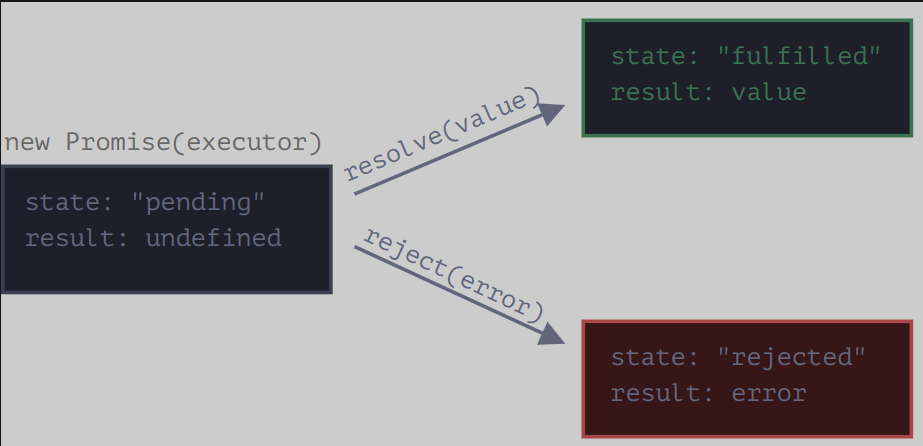
Creating a new Promise object.
Javascript has pre-defined
-
The executor is called automatically and immediately (by new Promise).
-
The executor function receives two callback functions as arguments:
resolveandreject.NOTE: These callback functions that the executor function receives, are pre-defined by the JavaScript engine.
Meaning it is NOT necessary that we keep these EXACT names in the function. The JS Engine has defined behaviour for each function, based on its position in the argument list of the Executor Function.
So we don’t need to create them. We should only call one of them when ready.
1new Promise(function executorFunction(resolve, reject) {
2  // Executor code
3})
Date objects in Javascript #
JavaScript Date objects represent a single moment in time in a platform-independent format.
Date objects contain a Number that represents milliseconds since 1 January 1970 UTC.
new Date() constructor vs. Date() function #
-
Calling
new Date()(theDate()constructor) returns aDateobject.When no parameters are provided, the newly-created
Dateobject represents the current date and time as of the time of instantiation. -
Calling the
Date()function (without thenewkeyword) returns astringrepresentation of the current date and time, exactly asnew Date().toString()does.Any arguments given in a
Date()function call (without thenewkeyword) are IGNORED; regardless of whether it's called with an invalid date string — or even called wth any arbitrary object or other primitive as an argument — it always returns a string representation of the CURRENT date and time.
Displaying dates using Date.prototype.toString() #
The Date object overrides the toString() method of Object.
Date.prototype.toString() returns a string representation of the Date as interpreted in the local timezone, containing both the date and the time.
Methods of Date objects #
Date.prototype.getFullYear()– Provides current year like 2022.Date.prototype.getMonth()– Provides current month values 0-11. Where 0 for Jan and 11 for Dec. So add +1 to get the result.Date.prototype.getDate()– Provides day of the month values 1-31.Date.prototype.getHours()– Provides current hour between 0-23.Date.prototype.getMinutes()– Provides current minutes between 0-59.Date.prototype.getSeconds()– Provides current seconds between 0-59.
DOM (Document Object Model) #
The Document Object Model (DOM) is the data representation of the objects that comprise the structure and content of a document on the web.
As an object-oriented representation of the web page, it can be modified with a scripting language such as JavaScript.
The DOM is not a programming language, but without it, the JavaScript language wouldn't have any model or notion of web pages, HTML documents, SVG documents, and their component parts.
The document as a whole, the head, tables within the document, table headers, text within the table cells, and all other elements in a document are parts of the document object model for that document.
They can all be accessed and manipulated using the DOM and a scripting language like JavaScript.
window.document #
window.document is a property of the window object returns a reference to the document object contained in the window.
document object #
The document object represents any web page loaded in the browser and serves as an entry point into the web page's content, which is the DOM tree.
window.document.forms #
The forms read-only property of the document interface returns an HTMLCollection object listing all of the document's forms.
Each item in the collection is a HTMLFormElement representing a single <form> element in the DOM. I
It allows access to—and, in some cases, modification of—aspects of the form, as well as access to its component elements.
Just like other HTMLCollection) objects, we can access each individual HTMLFormElement using its index position.
window.document.links #
The links read-only property of the document interface returns an HTMLCollection) of all <area> elements and <a> elements in a document with a value for the href attribute.
This is useful for extracting all the links from a web page.
window.document. #
TODO
window.document.scripts #
TODO
window.document.getElementsByTagName(<name>) #
The getElementsByTagName method of Document interface returns an HTMLCollection of all elements with the given tag name.
<name> : A string representing the name of the elements. The special string * represents all elements.
For example
1document.getElementsByTagName("span");
2document.getElementsByTagName("*");
window.document.getElementById(<name>) #
The getElementById() method returns an element with a specific ID. If an ID isn't unique, it returns the first occurrence.
The getElementById() method returns null if the element does not exist.
The getElementById() method is one of the most common methods in the HTML DOM. It is used almost every time you want to read or edit an HTML element.
1document.getElementById("demo");
Locating DOM Elements using complex CSS Selectors (Selectors API) #
The Selectors API provides methods that make it quick and easy to retrieve Element nodes from the DOM by matching against a set of selectors.
The methods of Selectors API accept any CSS selector, so you are no longer limited by selecting elements by id.
NOTE: Before we get into Element Selectors, it is important to note that CSS Pseudo-classes can't be used to select elements because as indicated by the name, pseudo-classes don't actually exist in the DOM Tree.
Since, these are NOT represented in the DOM tree, these can't be accessed by methods of Selectors API.
The methods of the Selector API are also prototype methods of the Element interface, which means that we can use these methods with the return values of getElementById(), etcetera.
<selectors> argument of Selector API methods #
Selectors to determine what element or elements should be returned.
This includes selector lists so you can group multiple selectors in a single query. For example,
1element, element, element { style properties }
Only elements can be selected, pseudo-classes are not supported.
NOTE: If the specified selectors include a CSS pseudo-element, the returned list/element is always EMPTY.
window.document.querySelector(<selectors>) OR Element.prototype.querySelector(<selectors>) #
- Return value: An Element object representing the first element in the document that matches the specified set of CSS selectors, or null is returned if there are no matches.
window.document.querySelectorAll(<selectors>) OR Element.prototype.querySelectorAll(<selectors>) #
- Return value : A non-live NodeList containing one Element object for each descendant node that matches at least one of the specified selectors.
What is an HTMLCollection? #
The HTMLCollection interface represents a generic collection of elements in document order and offers methods and properties for selecting from the list.
It is an Array-like object similar to arguments.
HTMLCollection items can be accessed by their name, id, or index number.
An HTMLCollection in the HTML DOM is live; it is automatically updated when the underlying document is changed.
For this reason it is a good idea to make a copy (eg. using Array.from) to iterate over if adding, moving, or removing nodes.
Creating an Array from an HTMLCollection #
We can make use of the Array.from() method to create an array from an HTMLCollection.
1let htmlCollection = document.getElementsByTagName("*");
2let arr = Array.from(htmlCollection);
This is helpful as then we can use built-in Array methods with the data obtained. For example:
1arr.forEach(function (element) {
2  window.console.log(element);
3})
Nodes in DOM #
In the DOM, all parts of the document, such as elements, attributes, text, etc. are organized in a hierarchical tree-like structure; where each node can have a parent, a list of child nodes and a nextSibling and previousSibling.
These individual parts of the document are known as nodes.
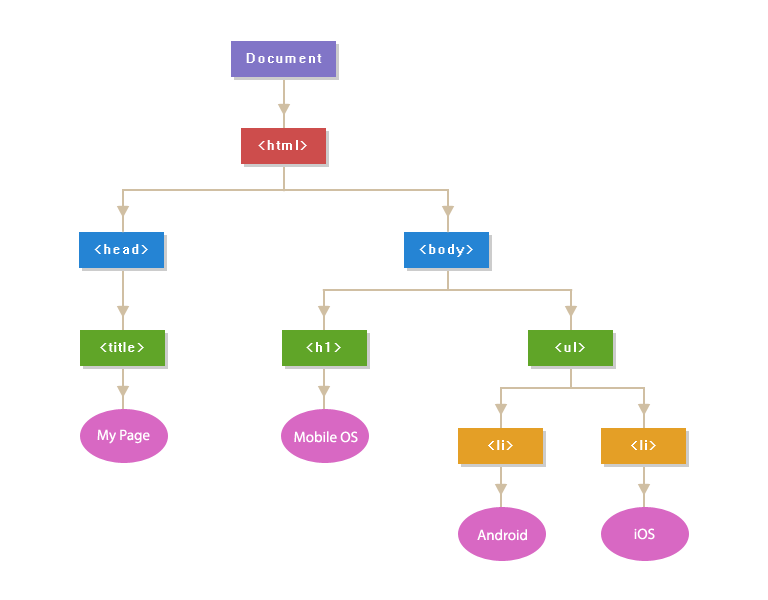
Types of Nodes (Node.nodeType property) #
The read-only nodeType property of a Node interface is an integer that identifies what the node is.
It distinguishes different kind of nodes from each other, such as elements, text and comments.
(Node.ELEMENT_NODE) or (nodeType = 1) #
Node.ELEMENT_NODE always returns 1.
When nodeType of a particular node is 1, it is an Element node, like <p> or <div>.
(Node.ATTRIBUTE_NODE) or (nodeType = 2) #
Node.ATTRIBUTE_NODE always returns 2.
We know that attributes (key-value pairs) such as padding, margin, etc, are also represent as Nodes in the DOM.
When nodeType of a particular node is 2, it is an Attribute of an Element.
(Node.TEXT_NODE) or (nodeType = 3) #
Node.TEXT_NODE always returns 3.
The actual Text inside an Element or Attr or the whitespaces/line-breaks between two HTML tags.
(Node.COMMENT_NODE) or (nodeType = 8) #
Node.COMMENT_NODE always returns 8.
A Comment node, such as <!-- … -->.
Node.nodeName #
It returns the name of the nodeType.
Node.childNodes property #
The childNodes property returns a collection (list) of an elements's child nodes (nodeType: 1, 3 and 8).
It returns a read-only NodeList object. childNodes[0] is the same as firstChild.
Node.children property #
children returns child elements (not text and comment nodes).
It returns an HTMLCollection object.
Node.childElementCount property #
It returns the count of the child elements.
Changing the text of a node #
When you set the innerText or the textContent property of an element, all child nodes are removed and replaced by only one new text node.
Node.innerText vs. Node.textContent #
-
The
innerTextproperty of theNodeinterface represents the RENDERED text content of a node and its descendants. -
The
textContentproperty of the Node interface represents raw textual content inside a node and its descendants.
1<div id="t"><div>lions,
2tigers</div><div style="visibility:hidden">and bears</div></div>
Here, innerText would yield "lions, tigers" and textContent would yield "lions,\ntigersand bears".
Notice the differences,
- The elements that are not rendered are also not present in
innerText. - The line-breaks in
innerTextfollow the line breaks that were introduced by layout (not the original text we stuffed in the DOM).
The best way to think about innerText is that it is roughly what you would get if you selected the text and copied.
Whereas, textContent is just a concatenation of the values of all Text nodes in the sub-tree.
The key takeaway is that innerText requires some information from the layout system to determine how the text is being presented to the user. This is what makes innerText one of those properties that can cause the PERFORMANCE of your app to go off the rails.
Removing & Replacing Nodes #
Element.replaceWith() #
The replaceWith() method replaces the ChildNode in the children list of its parent with another Node or string objects.
Here is an example:
1let element1 = document.getElementById("myId");
2let element2 = document.createElement("h1");
3let content = document.createTextNode("Added Content");
4element2.appendChild(content);
5element1.replaceWith(element2);
-
We are getting and element using its id
myId. -
Then we are creating a new heading element.
-
In the next step, we are adding the content to the
element2and finally, we are replacing the old element, with the newly created element.
The element with ID myId is stored as a reference in element1 which is we are able to manipulate it using the element1 identifier.
TODO : If in case we wished to stored the value of the element.
Node.replaceChild() #
The replaceChild() method replaces a child node with a new node.
We can create a new node, or the new node could be an existing node in the document or the new node could be an existing node in the document.
Node.removeChild() #
This method removes a specified child node of the specified element.
It will return the removed node as a Node object, or null if the node does not exist.
Remember that the removed child node is no longer part of the DOM.
Interfaces in DOM #
Inheritance Tree #

Element interface #
Element is the most general base class from which all element objects (i.e. objects that represent elements) in a Document inherit.
It only has methods and properties common to all kinds of elements.
For instance, elements like <p>, <div>, <span> when represented in the DOM, inherit from Element.
HTMLElement interface #
The HTMLElement interface represents any HTML element.
Some elements directly implement this interface, while others implement it via an interface that inherits it.
Attr interface #
The Attr interface represents one of an element's attributes as an object, which is a node in the DOM tree.
The core idea of an object of type Attr is the association between a name and a value. An attribute may also be part of a namespace and, in this case, it also has a URI identifying the namespace, and a prefix that is an abbreviation for the namespace.
In most situations, you will directly retrieve the attribute value as a string (e.g., Element.getAttribute()), but certain functions (e.g., Element.getAttributeNode()) or means of iterating return Attr instances.
For instance, attributes like padding: none, when represented in the DOM, inherit from Attr.
Text interface #
The Text interface represents a text node in a DOM tree.
To understand what a text node is, consider the following document:
1<html class="e"><head><title>Aliens?</title></head>
2<body>Why yes.
3</body>
4
5</html>
In this document, there are 4 text nodes, with the following contents:
- "
Aliens?" (the contents of thetitleelement) - "
\n" (after the</head>end tag, a newline) - "
Why yes.\n" (the contents of thebodyelement) - "
\n\n" (after the</body>tag)
Comment interface #
The Comment interface represents textual notations within markup; although it is generally not visually shown, such comments are available to be read in the source view.
Comments present in HTML documents inherit from Comment when represented in a DOM tree.
Creating, Removing & Replacing Elements #
document.createElement() #
The document.createElement() is a method used to create an HTML element.
For instance, this creates a new <div> element:
1let div = document.createElement('div');
document.createTextNode() #
This method creates a Text Node with the specified text.
document.appendChild() #
Appending in JavaScript is a way to insert content to the end of already existing elements.
To append in Javascript, we use the appendChild() method.
Using the last 3 commands in combination:
We use the createElement() method to create an element Node with the specified name.
We also create a text node using createTextNode(), which we append to the created element using the element.appendChild().
1var paragraph = document.createElement("p");
2var text = document.createTextNode("This is a paragraph.");
3paragraph.appendChild(text);
Working with Attributes #
JavaScript provides us with several methods for adding, removing or changing an HTML Element attribute.
Element.setAttribute() #
The setAttribute() method is used to set an attribute on the specified element.
Using this method, a new attribute is added with the specified name and value. If the attribute already exists on the element, the value is updated.
Here is an example:
1document.getElementById("myAnchor").setAttribute("href", "https://codewithharry.com/");
Element.getAttribute() #
The getAttribute() method is used to get the current value of a attribute on the specified element.
If the attribute does not exist on the element, it will return null.
This method returns a Boolean value that indicates if the element has the specified attribute. If the element contains an attribute, it will return true; otherwise, it will return false. Here is an example:
In this example, we find that if the <button> element has an onclick attribute:
1var h = document.getElementById("Btn").hasAttribute("onclick");
Element.removeAttribute() #
The removeAttribute() method is used to remove an attribute from the specified element.
The difference between this method and the removeAttributeNode() method is that the removeAttributeNode() method removes the specified Attr object, while this method removes the attribute with the specified name.
The result will be the same.
BUT, this method has no return value, while the removeAttributeNode() method returns the removed attribute as an Attr object.
Remove the href attribute from an <a> element:
1document.getElementById("myAnchor").removeAttribute("href");
Events in Javascript #
Events are actions or occurrences that happen in the system you are programming, which the system tells you about so your code can react to them.
The Event interface represents an event which takes place in the DOM.
There are many types of events, some of which use other interfaces based on the main Event interface.
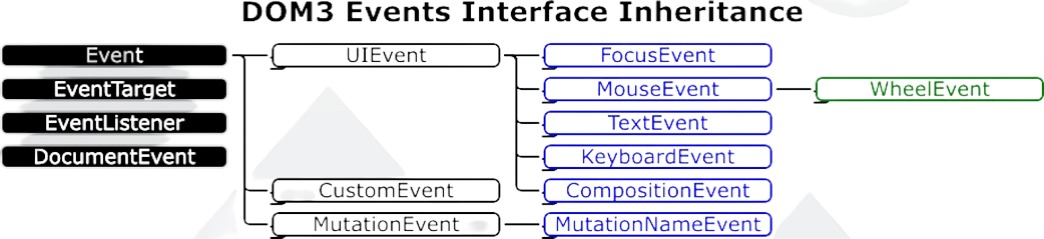
Event itself contains the properties and methods which are common to all events.
In simple words, HTML events are "things" that happen to HTML elements.
When JavaScript is used in HTML pages, JavaScript can "react" on these events.
Event Listeners vs. Event Handlers #
- Event listener listens out for the event happening.
- Event handler is the code that is run in response to it happening.
addEventListener() method #
The addEventListener() method attaches an event handler to the specified element. The addEventListener() method can have multiple event handlers applied to the same element. It doesn’t overwrite other event handlers.
The recommended mechanism for adding event handlers in web-pages is the addEventListener() method.
Inside the addEventListener() function, we specify two parameters:
- the name of the event we want to register this handler for.
- the code that comprises the handler function we want to run in response to it.
KeyboardEvent objects #
KeyboardEvent objects describe a user interaction with the keyboard; each event describes a single interaction between the user and a key (or combination of a key with modifier keys) on the keyboard.
Keyboard Event Attributes #
The following event Attributes can be added to HTML elements to define actions for events related to the keyboard.
-
(
Key= Value) - Attribute Description -
(
onkeydown= script/function) - Fires when a user is pressing a key.The
keydownevent fires multiple times if a user presses and holds a key. -
(
onkeyup= script/function) - Fires when a user releases a key.The
keyupevent fires only once when user releases the key.
For instance,
1<input type="text" onkeydown="myFunction()">
OR (in javascript)
1document.body.input.onkeydown = function(event) {
2    console.log(event);
3  };
Handling Keyboard Events using addEventListener() and KeyboardEvent objects' properties #
Note that simply removing the prefix on from the HTML event attribute values, gives us events which we can use with addEventListener() method. For example: onkeydown -> keydown.
We mainly use two properties of the KeyboardEvent objects:
-
KeyboardEvent.key: This property of the event object allows to get the character.This will be useful in the cases like differentiating between
Fandf, as well as detecting when we press the=key in combination with shift, which would make it+.However,
ShiftLeftandShiftRightwould both havekeyproperty asShift.1document.addEventListener("keydown", function(event) { 2 if (event.key === " ") { 3 console.log("Space bar pressed."); 4 } 5 else if (event.key === "F") { 6 console.log("Uppercase F."); 7 } 8 else if (event.key === "ArrowLeft") { 9 console.log("Left arrow key pressed."); 10 } 11} )
-
KeyboardEvent.code: This property of the event object allows to get the physical key code.This will be useful in the cases where we want to differentiate between
ShiftLeftandShiftRight.But this won't allow us to differentiate between
Fandf, because both of them would havecodeproperty asKeyF.1document.addEventListener("keyup", function(event) { 2 if (event.code === "ShiftLeft") { 3 console.log("Left shift pressed."); 4 } 5 else if (event.key === "AltRight") { 6 console.log("Right alt pressed."); 7 } 8 else if (event.key === "f") { 9 console.log("Lowercase F"); 10 } 11} )
MouseEvent objects #
The MouseEvent interface represents events that occur due to the user interacting with a pointing device (such as a mouse). Common events using this interface include click, dblclick, mouseup, mousedown
Mouse Event Attributes #
The following are some of the event Attributes can be added to HTML elements to define actions for events related to the keyboard. A comprehensive list can be accessed over here.
- (
Key= Value) - Attribute Description - (
onclick= script/function) - Fires on a mouse click on the element. - (
ondblclick= script/function) - Fires on a mouse double-click on the element. - (
onwheel= script/function) - Fires when the mouse wheel rolls up or down over an element
For instance,
1<button type="text" onclick="myFunction()">
OR (in javascript)
1button.onclick = function(event) {
2    if (event.altKey && event.shiftKey) {
3      alert('Hooray!');
4    }
5  };
Handling Mouse Events using addEventListener() and MouseEvent objectss properties #
Note that simply removing the prefix on from the HTML event attribute values, gives us events which we can use with addEventListener() method. For example: onwheel -> wheel.
ES6 (ECMAScript 6) Features #
Arrow Functions #
Rest Parameters #
TODO
let, const keywords & Temporal Dead Zones #
Given under Variable and Constant values above.
Unexpected Behaviors in Javascript #
Increasing the length of an Array #
Suppose we run the following code:
 1let array = [1, 2, 3];
 2
 3let index = 0;
 4while(true) {
 5  array[index] = index;
 6
 7  console.log(array[index]);
 8
 9  index++;
10}
In other strongly-types languages, for example C++, this would throw a segmentation fault error once we went out of the range of the memory allocated to array.
However, in Javascript, this would trigger an infinite loop, endlessly increasing the number of elements in array.
The output of this snippet would be something like this:
0
1
2
3
4
5
6
7
8
9
10
11
12
13
14
...
...
... until manual interruption
In order to prevent this, we should ALWAYS set an upper bound of the number of elements.
TODO #
Interfaces in TypeScript (mentioned in MDN) #
In TypeScript, an interface is an abstract type that tells the compiler which property names a given object can have. TypeScript creates implicit interfaces when you define an object with properties. It starts by looking at the object's property name and data type using TypeScript's type inference abilities.
If we think about it in terms of OOPs, it can be considered as a class. Objects can be instantiated from this class.
Interfaces aren't available in JavaScript but in documentation relating to DOM, Interfaces are mentioned since TypeScript is also a popular scripting language used nowadays.
Here is an example of the use of the word Interface.